<p align="center">
  <picture>
    <source media="(prefers-color-scheme: dark)" srcset="../assets/logo-dark.png">
    <img src="../assets/logo.png" width="220" alt="Ponytail、怠け者のシニア開発者">
  </picture>
</p>

<h1 align="center">Ponytail</h1>

<p align="center">
  <em>彼は何も言わない。一行だけ書く。それで動く。</em>
</p>

<p align="center">
  <a href="https://trendshift.io/repositories/50668?utm_source=repository-badge&amp;utm_medium=badge&amp;utm_campaign=badge-repository-50668" target="_blank" rel="noopener noreferrer"><img src="https://trendshift.io/api/badge/repositories/50668" alt="DietrichGebert%2Fponytail | Trendshift" width="250" height="55"/></a>
</p>

<p align="center">
  <img src="https://img.shields.io/github/stars/DietrichGebert/ponytail?style=flat-square&color=111111&label=stars" alt="Stars">
  <img src="https://img.shields.io/github/v/release/DietrichGebert/ponytail?style=flat-square&color=111111&label=release" alt="Release">
  <img src="https://img.shields.io/npm/v/@dietrichgebert/ponytail?style=flat-square&color=111111&label=npm" alt="npm">
  <img src="https://img.shields.io/badge/works%20with-20%20agents-111111?style=flat-square" alt="Works with 20 agents">
  <img src="https://img.shields.io/badge/license-MIT-111111?style=flat-square" alt="MIT license">
</p>

<p align="center">
  <a href="https://trendshift.io/repositories/50668" target="_blank" rel="noopener noreferrer"><img src="https://trendshift.io/api/badge/trendshift/repositories/50668/daily" alt="DietrichGebert/ponytail | Trendshift" width="250" height="55"/></a>
  <a href="https://trendshift.io/repositories/50668" target="_blank" rel="noopener noreferrer"><img src="https://trendshift.io/api/badge/trendshift/repositories/50668/weekly" alt="DietrichGebert/ponytail | Trendshift" width="250" height="55"/></a>
  <a href="https://trendshift.io/repositories/50668?utm_source=trendshift-badge&amp;utm_medium=badge&amp;utm_campaign=badge-trendshift-50668" target="_blank" rel="noopener noreferrer"><img src="https://trendshift.io/api/badge/trendshift/repositories/50668/monthly?language=JavaScript" alt="DietrichGebert%2Fponytail | Trendshift monthly ranking" width="250" height="55"/></a>
</p>

<p align="center">
  <strong>コード約 54% 削減（最大 94%）&middot; 約 20% 安い &middot; 約 27% 速い &middot; 100% 安全</strong><br>
  <sub>実際の FastAPI + React リポジトリを編集する実際の Claude Code セッションで、同じエージェントを skill あり・なしで比較（機能タスク 12 件、Haiku 4.5、n=4）。<a href="#numbers">詳細</a>。</sub>
</p>

<p align="center">
  <sub><a href="../README.md">English</a> &middot; <a href="README.es.md">Español</a> &middot; <a href="README.ko.md">한국어</a> &middot; <a href="README.zh-CN.md">简体中文</a> &middot; 日本語</sub><br>
  <sub>英語の README からの翻訳です。内容が異なる場合は<a href="../README.md">英語版</a>が正です。</sub>
</p>

---

<p align="center">
  <a href="https://ponytail.dev/soon"><img src="../assets/waitlist-banner.png" alt="何かが近づいている。ウェイトリストに登録" width="760"></a>
</p>

## Ponytail で作られたもの

<a href="https://theretriever.app">
  <picture>
    <source media="(prefers-color-scheme: dark)" srcset="../assets/retriever-logo-dark.svg">
    <img src="../assets/retriever-logo-light.svg" height="128" alt="Retriever">
  </picture>
</a>

---

あの人を知っているはずだ。長いポニーテール。楕円の眼鏡。バージョン管理システムより長く会社にいる。五十行を見せると、黙って眺めて、それを一行に置き換える。

Ponytail は、その人をあなたの AI エージェントの中に入れる。

## プロンプト

Ponytail はひとつのプロンプトだ：[`skills/ponytail/SKILL.md`](../skills/ponytail/SKILL.md)。ルールファイルを読むエージェント向けの短縮版は [`AGENTS.md`](../AGENTS.md)。このリポジトリの残りは、すべてそのプロンプトをいろいろなエージェントに読み込ませるためのものだ。

## インストール

**Claude Code**、二つのプロンプトに分けて：

```
/plugin marketplace add DietrichGebert/ponytail
```
```
/plugin install ponytail@ponytail
```

**Codex：**

```bash
codex plugin marketplace add DietrichGebert/ponytail
codex plugin add ponytail@ponytail
```

そのあと Codex で `/hooks` を開き、二つのライフサイクルフックを信頼して、新しいスレッドを始める。

**その他のエージェント：**[`AGENTS.md`](../AGENTS.md) をプロジェクトにコピーするか、エージェントに [`skills/ponytail/SKILL.md`](../skills/ponytail/SKILL.md) を skill としてインストールするよう頼む。Copilot、Cursor、OpenCode、Gemini などの手順（英語）：**[INSTALL.md](../INSTALL.md)**。

これで終わり。彼なら満足するだろう。口には出さないが。

毎セッション有効で、いくつかのコマンドがある（[コマンド](#commands)を参照）。`/ponytail ultra` は、コードベースに個人的に腹が立ったとき用だ。起動時とモード切り替え時に、現在のモードが表示される。

ponytail は GitHub の `DietrichGebert/ponytail` か npm の `@dietrichgebert/ponytail` からだけインストールすること。`.exe` や `.dll` ファイルは決して含まれない。それを含むコピーは私のものではない。

## ビフォー / アフター

日付ピッカーを頼む。エージェントは flatpickr をインストールし、ラッパーコンポーネントを書き、スタイルシートを追加し、タイムゾーンについての議論を始める。

ponytail なら：

```html
<!-- ponytail: browser has one -->
<input type="date">
```

生き残った例は [examples/](../examples/) にもっとある。

## 仕組み

コードを書く前に、エージェントは最初に成り立つ段で止まる：

```
1. それは本当に必要か？            → 不要なら：やらない（YAGNI）
2. もうこのコードベースにあるか？  → 書き直さずに再利用する
3. 標準ライブラリでできるか？      → それを使う
4. プラットフォームの標準機能は？  → それを使う
5. インストール済みの依存関係は？  → それを使う
6. 一行で済むか？                  → 一行で書く
7. そこで初めて：動く最小限のコード
```

このはしごは問題を理解した*あと*に動く。理解の代わりではない。変更が触れるコードを読み、実際の流れを追ってから段を選ぶ。解決策には怠けるが、読むことには決して怠けない。

怠け者だが、いい加減ではない。信頼境界での入力検証、データ損失への対処、セキュリティ、アクセシビリティは決して削らない。

<a id="commands"></a>
## コマンド

| コマンド | 内容 |
|----------|------|
| `/ponytail [lite \| full \| ultra \| off]` | 強度を設定するか、オフにする。引数なしの場合、オフならデフォルトのレベルでオンにし、オンなら現在のレベルを表示する。 |
| `/ponytail-review` | 現在の diff から過剰設計を探し、削除リストを返す。範囲を狭めたり広げたりするには、対象を普通の言葉で書く：`uncommitted`、`staged`、`branch`、または PR のリンク。 |
| `/ponytail-audit` | diff だけでなく、リポジトリ全体の過剰設計を監査する。 |
| `/ponytail-debt` | 後回しにした `ponytail:` の近道を一覧にまとめ、「あとで」が「永遠にやらない」にならないようにする。 |
| `/ponytail-gain` | ベンチマークで測定した効果（コード削減、コスト削減、速度向上）をスコアボードで表示する。 |
| `/ponytail-help` | 上記コマンドのクイックリファレンス。 |

コマンドには skill に対応したホストが必要だ（Claude Code、Codex、Devin CLI、OpenCode、Gemini、pi、Hermes Agent、Qoder、Grok Build）。Codex CLI と IDE 拡張では、プラグインの名前空間の下にある skill なので、`$ponytail:ponytail-review` のように呼び出す。[フック](../INSTALL.md#cursor)を使う Cursor では `/ponytail` のレベル切り替えだけが使え、普通のメッセージとして入力する。指示だけのアダプター（Cursor のルールファイル、Windsurf、Cline、Copilot、Kiro、Antigravity）は、コマンドなしで常時有効なルールだけを読み込む。

<a id="numbers"></a>
## 数字

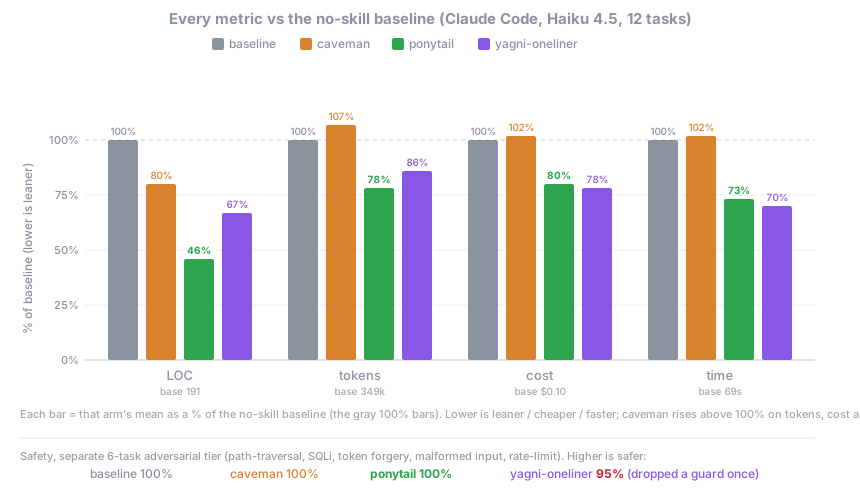
正直な測定とは、実際のエージェントに実際の仕事をさせることだ。ヘッドレスの Claude Code セッションが [tiangolo の full-stack-fastapi-template](https://github.com/fastapi/full-stack-fastapi-template)（実際の FastAPI + React リポジトリ）を編集し、残した `git diff` で採点する。機能チケット 12 件、同じエージェントを skill あり・なしで、n=4、Haiku 4.5。

<p align="center">
  <img src="../assets/benchmark-agentic.svg" width="860" alt="各グループを skill なしのベースラインに対する割合で示したグラフ（行数、トークン、コスト、時間、Haiku 4.5）。ponytail はすべての指標で最も低い（行数 46%、トークン 78%、コスト 80%、時間 73%）。caveman はトークン、コスト、時間で 100% を超える。yagni-oneliner の行数は 67%。安全性（別の攻撃テスト）：ベースライン、caveman、ponytail は 100%、yagni-oneliner は 95%。">
</p>

| skill なしのベースライン比 | 行数 | トークン | コスト | 時間 | 安全 |
|---|--:|--:|--:|--:|--:|
| **ponytail** | **-54%** | **-22%** | **-20%** | **-27%** | **100%** |
| caveman（簡潔な話し方の対照群） | -20% | +7% | +3% | +2% | 100% |
| 「YAGNI + 一行」プロンプト | -33% | -14% | -21% | -30% | 95% |

すべての指標を削減したのは ponytail だけで、削減しながら完全に安全だったのも ponytail だけだ。作り込みすぎの罠が本当にある場所ほど大きく減り（日付ピッカーは 404 行から 23 行、カラーピッカーは 287 行から 23 行。コンポーネントの代わりにネイティブの `<input>` を使うからだ）、もともと最小限のコードではほとんど減らない。完全な手法、タスクごとの表、制約：[benchmarks/results/2026-06-18-agentic.md](../benchmarks/results/2026-06-18-agentic.md)。

<details>
<summary><strong>以前の単発測定の数字（単独生成）</strong></summary>

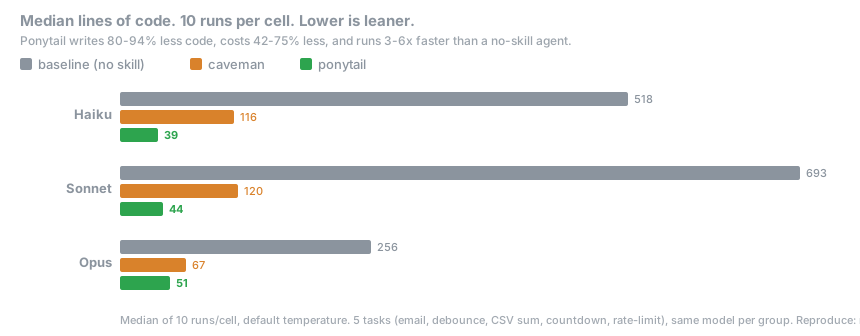
日常的なタスク 5 件、モデル 3 つ、グループ 3 つ（skill なし、[caveman](https://github.com/JuliusBrussee/caveman)、ponytail）、各 10 回実行、中央値を報告。プロンプト一つ、回答一つ、回答の行数を数える：

<p align="center">
  <img src="../assets/benchmark-3model.svg" width="860" alt="Haiku、Sonnet、Opus におけるグループごとのコード行数の中央値">
</p>

ここでは**コード 80-94% 削減**という結果が出た。[#126](https://github.com/DietrichGebert/ponytail/issues/126) がもっともな指摘をしたとおり、何も付けていないベースラインのモデルは説明文や選択肢で回答を膨らませるので、その差の一部は会話形式のベースラインが生んだ見かけ上のものだ。上のエージェントでの数字が、修正済みで、根拠を示せる版だ。単発測定は `npx promptfoo eval -c benchmarks/promptfooconfig.yaml` で再現できる。

</details>

**ルールは一度も「トークンを最小に」ではなかった。**ルールはこうだ：タスクに必要なものだけを書き、検証、エラー処理、セキュリティ、アクセシビリティは決して削らない。コードが小さくなるのは必要な分だけだからであって、無理に詰めたからではない。コストとレイテンシの低下は、はしごに従うモデルでの副次的な効果だ。段を検討するために思考トークンを使う簡潔な推論モデルでは、逆になることもある（GPT-5.5 ではそうなる）。

## よくある質問

**[caveman](https://github.com/JuliusBrussee/caveman) と一緒に使える？**
使える。むしろ使うべきだ。caveman はエージェントが話すことを縮め、ponytail はエージェントが作るものを縮める。別々の半分なので重ならない。caveman はコードを 1 バイトも変えず、ponytail は話し方に手を出さない。最小限のコードについて、短く話す。

**設定ファイルは必要？**
いらない。任意の `~/.config/ponytail/config.json` か環境変数 `PONYTAIL_DEFAULT_MODE` でデフォルトのレベルを設定できるが、必須のものはない。

**120 行のキャッシュクラスが本当に必要だったら？**
必要ない。それでも言い張れば作ってくれる。ゆっくり。正確に。あなたを見つめながら。

**スケールする？**
書かなかったコードは無限にスケールする。バグ 0、CVE 0、太古の昔から稼働率 100%。

**なぜ「ponytail」？**
理由はよくわかっているはずだ。

## スポンサー

<p align="center">
  <a href="https://greenpt.com/">
    <picture>
      <source media="(prefers-color-scheme: dark)" srcset="../assets/logo-greenpt-dark.svg">
      <img src="../assets/logo-greenpt.svg" width="260" alt="GreenPT">
    </picture>
  </a>
</p>

## ライセンス

[MIT](../LICENSE)。動く中でいちばん短いライセンス。

## スター履歴

<a href="https://www.star-history.com/dietrichgebert/ponytail#history">
 <picture>
   <source media="(prefers-color-scheme: dark)" srcset="https://api.star-history.com/chart?repos=DietrichGebert/ponytail&type=Date&theme=dark" />
   <source media="(prefers-color-scheme: light)" srcset="https://api.star-history.com/chart?repos=DietrichGebert/ponytail&type=Date" />
   <img alt="Star History Chart" src="https://api.star-history.com/chart?repos=DietrichGebert/ponytail&type=Date" />
 </picture>
</a>