코드 약 54% 감소 (최대 94%) · 약 20% 저렴 · 약 27% 빠름 · 100% 안전 실제 FastAPI + React 저장소를 고치는 실제 Claude Code 세션에서, 같은 에이전트를 스킬이 있을 때와 없을 때로 비교했다 (기능 작업 12개, Haiku 4.5, n=4). 자세히.
## Ponytail로 이미 만든 것
---
누군지 알 것이다. 긴 포니테일. 타원형 안경. 버전 관리 시스템보다 회사에 오래 있었다. 쉰 줄을 보여 주면 가만히 보다가, 아무 말 없이 한 줄로 바꿔 놓는다.
Ponytail은 그 사람을 당신의 AI 에이전트 안에 넣는다.
## 프롬프트
Ponytail은 프롬프트 하나다: [`skills/ponytail/SKILL.md`](../skills/ponytail/SKILL.md). 규칙 파일을 읽는 에이전트용 압축판은 [`AGENTS.md`](../AGENTS.md)다. 이 저장소의 나머지는 전부 그 프롬프트를 여러 에이전트에 넣기 위한 것이다.
## 설치
**Claude Code**, 프롬프트 두 개로 나눠서:
```
/plugin marketplace add DietrichGebert/ponytail
```
```
/plugin install ponytail@ponytail
```
**Codex:**
```bash
codex plugin marketplace add DietrichGebert/ponytail
codex plugin add ponytail@ponytail
```
그다음 Codex에서 `/hooks`를 열어 라이프사이클 훅 두 개를 신뢰하고, 새 스레드를 시작한다.
**그 밖의 에이전트:** [`AGENTS.md`](../AGENTS.md)를 프로젝트에 복사하거나, 에이전트에게 [`skills/ponytail/SKILL.md`](../skills/ponytail/SKILL.md)를 스킬로 설치해 달라고 하면 된다. Copilot, Cursor, OpenCode, Gemini 등의 단계별 설치 방법(영어): **[INSTALL.md](../INSTALL.md)**.
이게 다다. 그 사람이라면 뿌듯해할 것이다. 말은 안 하겠지만.
모든 세션에서 켜져 있고, 명령어가 몇 개 있다 ([명령어](#commands) 참고). `/ponytail ultra`는 코드베이스가 당신을 개인적으로 화나게 했을 때를 위한 것이다. 시작할 때와 모드를 바꿀 때 현재 모드가 표시된다.
ponytail은 GitHub의 `DietrichGebert/ponytail`이나 npm의 `@dietrichgebert/ponytail`에서만 설치한다. `.exe`나 `.dll` 파일은 절대 들어 있지 않다. 그런 파일이 들어 있는 사본은 내 것이 아니다.
## 전 / 후
날짜 선택기를 부탁한다. 에이전트가 flatpickr를 설치하고, 래퍼 컴포넌트를 쓰고, 스타일시트를 추가하고, 시간대에 대한 토론을 시작한다.
ponytail을 쓰면:
```html
```
살아남은 예제는 [examples/](../examples/)에 더 있다.
## 작동 방식
코드를 쓰기 전에, 에이전트는 성립하는 첫 번째 단계에서 멈춘다:
```
1. 이게 꼭 있어야 하나? → 아니면 건너뛴다 (YAGNI)
2. 이미 이 코드베이스에 있나? → 다시 쓰지 말고 재사용한다
3. 표준 라이브러리가 해 주나? → 그걸 쓴다
4. 플랫폼 기본 기능이 있나? → 그걸 쓴다
5. 이미 설치된 의존성이 있나? → 그걸 쓴다
6. 한 줄로 되나? → 한 줄로 쓴다
7. 그다음에야: 돌아가는 최소한의 코드
```
이 사다리는 문제를 이해한 *다음에* 돈다. 이해를 대신하지 않는다. 변경이 닿는 코드를 읽고 실제 흐름을 따라간 뒤에 단계를 고른다. 해결책에는 게으르고, 읽기에는 절대 게으르지 않다.
게으르지만 무책임하지는 않다. 신뢰 경계의 입력 검증, 데이터 손실 처리, 보안, 접근성은 절대 잘라 내지 않는다.
## 명령어
| 명령어 | 하는 일 |
|--------|---------|
| `/ponytail [lite \| full \| ultra \| off]` | 강도를 정하거나 끈다. 인자 없이 쓰면, 꺼져 있을 때는 기본 레벨로 켜고, 켜져 있을 때는 현재 레벨을 알려 준다. |
| `/ponytail-review` | 현재 diff에서 과잉 설계를 찾아 지울 목록을 돌려준다. 범위를 좁히거나 넓히려면 대상을 평범한 말로 적는다: `uncommitted`, `staged`, `branch`, 또는 PR 링크. |
| `/ponytail-audit` | diff만이 아니라 저장소 전체에서 과잉 설계를 점검한다. |
| `/ponytail-debt` | 미뤄 둔 `ponytail:` 지름길을 목록으로 모아, "나중에"가 "절대 안 함"이 되지 않게 한다. |
| `/ponytail-gain` | 벤치마크에서 측정한 효과(코드 감소, 비용 감소, 속도 향상)를 점수판으로 보여 준다. |
| `/ponytail-help` | 위 명령어들의 빠른 참고. |
명령어는 스킬을 지원하는 호스트가 있어야 한다 (Claude Code, Codex, Devin CLI, OpenCode, Gemini, pi, Hermes Agent, Qoder, Grok Build). Codex CLI와 IDE 확장에서는 플러그인 네임스페이스 아래의 스킬이므로 `$ponytail:ponytail-review`처럼 부른다. [훅](../INSTALL.md#cursor)을 쓰는 Cursor는 `/ponytail` 레벨 전환만 되고, 일반 메시지로 입력한다. 지시문만 쓰는 어댑터(Cursor 규칙 파일, Windsurf, Cline, Copilot, Kiro, Antigravity)는 명령어 없이 항상 켜진 규칙만 불러온다.
## 수치
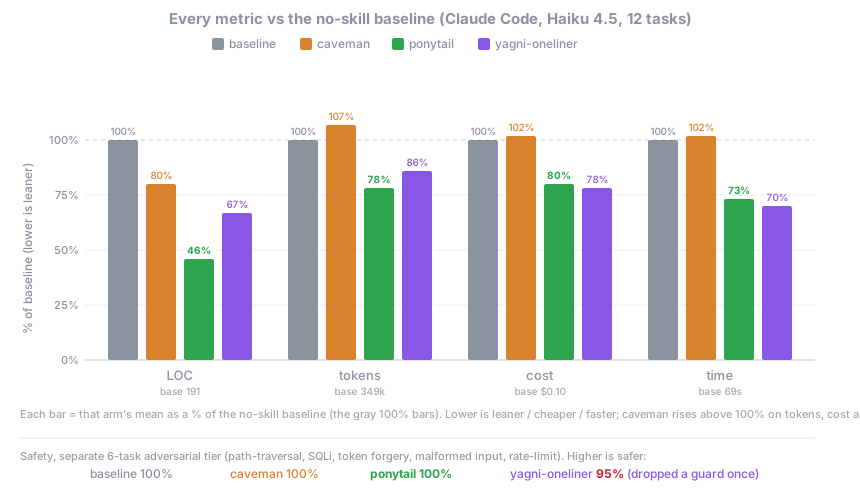
정직한 측정은 실제 에이전트가 실제 일을 하는 것이다. 헤드리스 Claude Code 세션이 [tiangolo의 full-stack-fastapi-template](https://github.com/fastapi/full-stack-fastapi-template)(실제 FastAPI + React 저장소)를 고치고, 남긴 `git diff`로 점수를 매긴다. 기능 티켓 12개, 같은 에이전트를 스킬이 있을 때와 없을 때로, n=4, Haiku 4.5.
| 스킬 없는 기준선 대비 | 줄 수 | 토큰 | 비용 | 시간 | 안전 |
|---|--:|--:|--:|--:|--:|
| **ponytail** | **-54%** | **-22%** | **-20%** | **-27%** | **100%** |
| caveman (간결한 말투 대조군) | -20% | +7% | +3% | +2% | 100% |
| "YAGNI + 한 줄짜리" 프롬프트 | -33% | -14% | -21% | -30% | 95% |
모든 지표를 줄이는 것은 ponytail뿐이고, 그러면서도 완전히 안전한 것도 ponytail뿐이다. 과잉 구축의 함정이 실제로 있는 곳에서 가장 많이 줄어들고 (날짜 선택기 404줄에서 23줄, 색상 선택기 287줄에서 23줄. 컴포넌트 대신 기본 ``을 쓰기 때문이다), 이미 최소한인 코드에서는 거의 줄지 않는다. 전체 방법, 작업별 표, 한계: [benchmarks/results/2026-06-18-agentic.md](../benchmarks/results/2026-06-18-agentic.md).
예전 단발 측정 수치 (단독 생성)
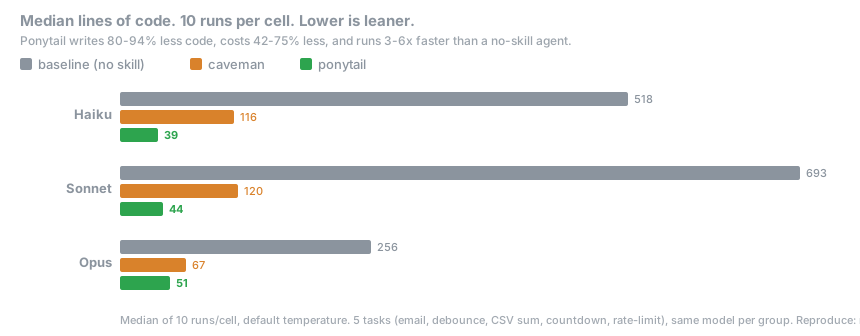
일상적인 작업 5개, 모델 3개, 비교군 3개 (스킬 없음, [caveman](https://github.com/JuliusBrussee/caveman), ponytail), 10회 실행, 중앙값 보고. 프롬프트 하나, 응답 하나, 응답의 줄 수를 센다:
여기서는 **코드 80-94% 감소**가 나왔다. [#126](https://github.com/DietrichGebert/ponytail/issues/126)이 정확히 지적했듯, 아무것도 붙이지 않은 기준선 모델은 응답을 설명과 선택지로 부풀리기 때문에, 그 차이의 일부는 대화형 기준선이 만든 착시다. 위의 에이전트 수치가 바로잡은, 방어할 수 있는 버전이다. 단발 측정은 `npx promptfoo eval -c benchmarks/promptfooconfig.yaml`로 재현할 수 있다.
**규칙은 처음부터 "토큰을 가장 적게"가 아니었다.** 규칙은 이것이다: 작업에 필요한 것만 쓰고, 검증, 오류 처리, 보안, 접근성은 절대 잘라 내지 않는다. 코드가 작아지는 것은 필요한 만큼이기 때문이지, 억지로 줄였기 때문이 아니다. 비용과 지연 시간이 줄어드는 것은 사다리를 따르는 모델에서 생기는 부수 효과다. 단계를 고민하느라 사고 토큰을 쓰는 간결한 추론 모델에서는 반대가 될 수 있다 (GPT-5.5에서는 그렇다).
## 자주 묻는 질문
**[caveman](https://github.com/JuliusBrussee/caveman)과 같이 써도 되나?**
된다. 같이 쓰는 게 좋다. caveman은 에이전트가 하는 말을 줄이고, ponytail은 에이전트가 만드는 것을 줄인다. 서로 다른 절반이라 겹치지 않는다. caveman은 코드를 바이트 하나까지 그대로 두고, ponytail은 말투에 손대지 않는다. 최소한의 코드에 대한 짧은 말.
**설정 파일이 필요한가?**
아니다. 선택 사항인 `~/.config/ponytail/config.json`이나 `PONYTAIL_DEFAULT_MODE` 환경 변수로 기본 레벨을 정할 수 있지만, 필요한 것은 없다.
**120줄짜리 캐시 클래스가 정말 필요하면?**
필요 없다. 그래도 고집하면 만들어 준다. 천천히. 정확하게. 당신을 쳐다보면서.
**확장성은?**
쓰지 않은 코드는 무한히 확장된다. 버그 0개, CVE 0개, 태초부터 가동률 100%.
**왜 "ponytail"인가?**
왜인지 정확히 알 것이다.
## 후원
## 라이선스
[MIT](../LICENSE). 돌아가는 가장 짧은 라이선스.
## 스타 기록